<?xml version="1.0" encoding="utf-8"?>
<feed xmlns="http://www.w3.org/2005/Atom">
	<title>jmlacroix - derniers articles</title>
	<link href="http://jmlacroix.com/atom.xml" rel="self"/>
	<link href="http://jmlacroix.com"/>
	<updated>2012-05-07T20:07:49-04:00</updated>
	<id>http://jmlacroix.com</id>
	<author>
		<name>Jean-Michel Lacroix</name>
		<email>jmlacroix gmail</email>
	</author>

	
	<entry>
		<title>Follow-up on VIM Syntax Highlight Exporting</title>
		<link href="http://jmlacroix.com/archives/revimhl.html" />
		<updated>2012-02-04T00:00:00-05:00</updated>
		<id>http://jmlacroix.com/archives/revimhl</id>
		<content type="xhtml">
			<div xmlns='http://www.w3.org/1999/xhtml'>
			<p>It has been a couple of months since I first wrote about <a href="/archives/export-vim-highlight.html">exporting VIM Syntax highlight</a>. Back then, I said I would follow-up with an awk script to ease the extraction for a blogging engine, and I still haven't delivered.</p>

<p>Well, here's the script. Hope you enjoy it.</p>

			</div>
		</content>
	</entry>
	
	<entry>
		<title>Introduction à la programmation fonctionnelle avec Haskell</title>
		<link href="http://jmlacroix.com/archives/ipfh.html" />
		<updated>2011-12-01T00:00:00-05:00</updated>
		<id>http://jmlacroix.com/archives/ipfh</id>
		<content type="xhtml">
			<div xmlns='http://www.w3.org/1999/xhtml'>
			<p>Survol des différentes caractéristiques des langages fonctionnels accompagné d'exemples simples avec Haskell. Présentation effectuée dans le cadre du <a href="http://opencode.ca">OpenCode</a> 01-12-2011.</p>

<script src="http://speakerdeck.com/embed/4ed9711946f378004d000cd5.js"></script>


			</div>
		</content>
	</entry>
	
	<entry>
		<title>Exporting VIM Syntax Highlight</title>
		<link href="http://jmlacroix.com/archives/export-vim-highlight.html" />
		<updated>2011-09-14T00:00:00-04:00</updated>
		<id>http://jmlacroix.com/archives/export-vim-highlight</id>
		<content type="xhtml">
			<div xmlns='http://www.w3.org/1999/xhtml'>
			<p>I've been looking for a tool to replace the GitHub Gists I'm using to highlight code on these pages. Gists are great, but I wanted something that doesn't rely on JavaScript (for SEO, accessibility and performance reasons).</p>

<p>While taking a look at 3rd party libs, I flashed: why not use the output of my favorite editor, VIM? It has powerful syntax highlighting and a lot of syntax files. I can even use color schemes and some of VIM's settings, such as line numbering, to make my life easier (and it reads my <code>vimrc</code>!).</p>

<p>So instead of using simple tools, I went for the complicated solution. I made two script to help extracting HTML-formatted syntax and its associated CSS styles. Note that these scripts outputs their results on <code>stdout</code>, so they won't alter your files.</p>

<h2>Converting to HTML</h2>

<p><code>highlight.sh</code> outputs HTML-formatted syntax highlight of a file:</p>

<p><a class="src" href="https://gist.github.com/1218309">#</a></p>


<pre>
<span class="Comment">#/bin/bash</span>

<span class="Identifier">OUTFILE</span>=<span class="PreProc">$(</span><span class="Special">mktemp -t highlight</span><span class="PreProc">)</span>

<span class="Identifier">INFILE</span>=<span class="PreProc">$1</span>
<span class="Identifier">PARAM</span>=<span class="Statement">&quot;</span><span class="String">set nonumber</span><span class="Statement">&quot;</span>

<span class="Statement">if </span><span class="Statement">[</span> <span class="Statement">-z</span> <span class="Statement">&quot;</span><span class="PreProc">$INFILE</span><span class="Statement">&quot;</span> <span class="Statement">]</span>
<span class="Statement">then</span>
    <span class="Statement">echo</span><span class="String"> </span><span class="Statement">&quot;</span><span class="String">usage: </span><span class="PreProc">$0</span><span class="String"> source.file</span><span class="Statement">&quot;</span>
    <span class="Statement">exit</span>
<span class="Statement">fi</span>

vim +<span class="Statement">&quot;</span><span class="PreProc">$PARAM</span><span class="Statement">&quot;</span> <span class="Statement">\</span>
    +<span class="Statement">'</span><span class="String">let html_use_css=1</span><span class="Statement">'</span> <span class="Statement">\</span>
    +<span class="Statement">'</span><span class="String">TOhtml</span><span class="Statement">'</span> <span class="Statement">\</span>
    +<span class="Statement">'</span><span class="String">/&lt;pre&gt;/,/&lt;\/pre&gt;/d a</span><span class="Statement">'</span> <span class="Statement">\</span>
    +<span class="Statement">'</span><span class="String">g/./d</span><span class="Statement">'</span> <span class="Statement">\</span>
    +<span class="Statement">'</span><span class="String">1pu! a</span><span class="Statement">'</span> <span class="Statement">\</span>
    +<span class="Statement">'</span><span class="String">$d</span><span class="Statement">'</span> <span class="Statement">\</span>
    +<span class="Statement">&quot;</span><span class="String">wq! </span><span class="PreProc">$OUTFILE</span><span class="Statement">&quot;</span> <span class="Statement">\</span>
    +<span class="Statement">'</span><span class="String">q!</span><span class="Statement">'</span> <span class="PreProc">$INFILE</span> &amp;<span class="Statement">&gt;</span>/dev/null

cat <span class="PreProc">$OUTFILE</span> &amp;&amp; <span class="Statement">rm</span> <span class="PreProc">$OUTFILE</span>
</pre>


<p>Try the script on itself:</p>

<pre><code>$ bash highlight.sh highlight.sh
</code></pre>

<h2>Extracting CSS</h2>

<p><code>syntax.sh</code> loads VIM's syntax test and outputs its generated CSS styles:</p>

<p><a class="src" href="https://gist.github.com/1218308">#</a></p>


<pre>
<span class="Comment">#!/bin/bash</span>

<span class="Identifier">OUTFILE</span>=<span class="PreProc">$(</span><span class="Special">mktemp -t syntax</span><span class="PreProc">)</span>

vim +<span class="Statement">'</span><span class="String">so $VIMRUNTIME/syntax/hitest.vim</span><span class="Statement">'</span> <span class="Statement">\</span>
    +<span class="Statement">'</span><span class="String">let html_use_css=1</span><span class="Statement">'</span> <span class="Statement">\</span>
    +<span class="Statement">'</span><span class="String">TOhtml</span><span class="Statement">'</span> <span class="Statement">\</span>
    +<span class="Statement">'</span><span class="String">v/^\./d</span><span class="Statement">'</span> <span class="Statement">\</span>
    +<span class="Statement">&quot;</span><span class="String">wq! </span><span class="PreProc">$OUTFILE</span><span class="Statement">&quot;</span> <span class="Statement">\</span>
    +<span class="Statement">'</span><span class="String">q!</span><span class="Statement">'</span> &amp;<span class="Statement">&gt;</span>/dev/null

cat <span class="PreProc">$OUTFILE</span> &amp;&amp; <span class="Statement">rm</span> <span class="PreProc">$OUTFILE</span>
</pre>


<p>Extract current vim colors as CSS:</p>

<pre><code>$ bash syntax.sh
</code></pre>

<h2>Further Integration</h2>

<p>Currently, it's not the best way to integrate code into my posts. It's not automated and I need to manually insert the HTML. I've made an <code>awk</code> script to help with this task. I'll post about it when it's integrated into my process.</p>

			</div>
		</content>
	</entry>
	
	<entry>
		<title>Replacing a Dev VPS with Linux on OSX</title>
		<link href="http://jmlacroix.com/archives/osx-linux-vps.html" />
		<updated>2011-09-05T00:00:00-04:00</updated>
		<id>http://jmlacroix.com/archives/osx-linux-vps</id>
		<content type="xhtml">
			<div xmlns='http://www.w3.org/1999/xhtml'>
			<p><em>Update: For a great discussion on the topic, see the <a href="http://news.ycombinator.com/item?id=2969072">Hacker News discussion page</a>.</em></p>

<p>As much as I love my Mac, I'm sometimes having uncontrollable urges to install Linuxy stuff on it. Sometimes it works great (thanks mostly to <a href="http://mxcl.github.com/homebrew/">homebrew</a>), but at other times it's flaky or impossible.</p>

<p>So I've been looking for a Linux VPS, to have a Linux machine handy when I want to play around and try stuff. But, since I'm using <a href="http://wiki.qemu.org/Main_Page">QEMU</a> (a lightweight virtualization tool) a lot at work, I tried using it as a background Linux virtual machine that's always available.</p>

<p>I now have a FREE, always-on (using negligible CPU and RAM when idle) Linux machine that is available whenever I need it, wherever I am. It's also quite useful to test tools so I don't mess with my <em>stable</em> environment: it's too easy to break the world when installing lots of stuff.</p>

<h2>Installation</h2>

<p>Download an ISO version of the distribution you want to install (in my case, the excellent <a href="http://archlinux.org">Arch Linux</a>) and fire up your favorite terminal.</p>

<p>Install QEMU <sup id="fn1"><a href="#ffn1">1</a></sup>:</p>

<pre><code>$ brew install qemu
</code></pre>

<p>Create a Qcow2 image, that can expand up to 10GB:</p>

<pre><code>$ qemu-img create -f qcow2 archlinux.qcow2 10G
</code></pre>

<p>Launch QEMU with your image attached as main hard drive and your ISO as cdrom:</p>

<pre><code>$ qemu-system-x86_64 -m 512 -hda archlinux.qcow2 \
                     -cdrom archlinux.iso
</code></pre>

<p>Before shutting it down, make sure you enable the OpenSSH sever so you can log in later.</p>

<p>To access the VM via SSH from the local machine, boot it with a network redirection:</p>

<pre><code>$ qemu-system-x86_64 -m 512 -hda archlinux.qcow2 \
                     -redir tcp:2222::22
</code></pre>

<p>This redirects all traffic from localhost port 2222 to VM port 22.</p>

<p>When it's done booting, try to connect to via SSH with the following command:</p>

<pre><code>$ ssh username@localhost --port 2222
</code></pre>

<p>Once you get this working, shut it down.</p>

<h2>Usage</h2>

<p>There's many ways to start the machine, I use a bash function in my <code>~/.bashrc</code> file to launch it when I need it:</p>

<pre>
<span class="Function">function</span> <span class="Function">linux {</span>
    qemu-system-x86_64 <span class="Special">-m</span> <span class="Number">512</span> <span class="Special">-hda</span> archlinux.qcow2 \
                       <span class="Special">-redir</span> tcp:<span class="Number">2222</span>::<span class="Number">22</span> \
                       <span class="Special">-nographic</span> <span class="Special">-daemonize</span>
<span class="Function">}</span>
</pre>


<!--    function linux {
        qemu-system-x86_64 -m 512 -hda archlinux.qcow2 -redir tcp:2222::22 \
                           -nographic -daemonize
    }
-->


<p>Notice the <code>-nographic</code> and <code>-daemonize</code> options: they ensure the machine is started as a background process.</p>

<p>For faster connection, add these settings in your <code>~/.ssh/config</code> file:</p>

<pre>
<span class="Type">Host</span> linux
    <span class="Statement">Hostname</span> localhost
    <span class="Statement">Port</span>     <span class="Constant">2222</span>
    <span class="Statement">User</span>     jm
</pre>


<!--    Host linux
        User     username
        Hostname localhost
        Port     2222
-->


<p>You can now connect and copy files to your new home easily with</p>

<pre><code>$ ssh linux
</code></pre>

<p>and</p>

<pre><code>$ scp file.txt linux:
</code></pre>

<p>For maximum fun, setup a shared folder on your local machine that your VM can access for easier file sharing. It's also a good idea to make a backup copy of your stable image so that you can replace a broken VM by a clean new one.</p>

<p>Have fun playing with your new development environment.</p>

<p><footer>
  <a href="/">Jean-Michel Lacroix</a> &ndash;
  <time datetime="2011-09-05T00:00:00-04:00" pubdate="pubdate">September 05, 2011</time>
</footer></p>

<p><section class="footnotes"></p>

<ol>
<li id="ffn1">There seems to be a problem with the BIOS in daemon mode in QEMU 0.15 on OSX, so make sure you install version 0.14.1. <a href="#fn1" title="Jump back to footnote 1 in the text.">&#8617;</a><br/>
<pre>brew install https://raw.github.com/mxcl/homebrew/\
bf2dd2bea04daf78a98888cf20fdf438fb777112/Library/Formula/qemu.rb</pre></li>
</ol>


<p></section></p>

			</div>
		</content>
	</entry>
	
	<entry>
		<title>DRY your SSH Config with Rubbissh</title>
		<link href="http://jmlacroix.com/archives/introducing-rubbissh.html" />
		<updated>2011-01-31T00:00:00-05:00</updated>
		<id>http://jmlacroix.com/archives/introducing-rubbissh</id>
		<content type="xhtml">
			<div xmlns='http://www.w3.org/1999/xhtml'>
			<p>I really hate to repeat myself, and that happens way too much when managing
my ever-growing <code>~/.ssh/config</code> file. I decided to get my hands dirty and
created a tool to handle all the repeating.</p>

<h2>How It Works</h2>

<p>Define your ssh rules in a YAML formatted <code>config.yml</code> file:</p>

<pre><code>*:
  server_alive_interval: 30
  server_alive_count_max: 120

dev-:
  *:
    user: bobby
    port: 1221

  website: my-web-host.com
  database:
    host_name: my-db-host.com
    identity_file: ~/ident.key
</code></pre>

<p>Use <code>rubbissh</code> to generate a classic ssh config file:</p>

<pre><code>Host *
    ServerAliveCountMax 120
    ServerAliveInterval 30
Host dev-*
    User    bobby
    Port    1221
Host dev-database
    HostName    my-db-host.com
    IdentityFile    ~/ident.key
Host dev-website
    HostName    my-web-host.com
</code></pre>

<h2>More Details</h2>

<ul>
<li>Using the <code>*</code> wildcard at any level will define default keywords for all
machines in the group.</li>
<li>Using a <code>-</code> at the end of a machine name creates a server group.</li>
<li>The default vaue of a <code>server</code>: <code>string</code> match is its host name.</li>
<li>You can nest as much definitions as you want.</li>
</ul>


<p>You can get more information on installation, fork the sources or report
problems <a href="http://github.com/jmlacroix/rubbissh">on GitHub</a>.</p>

			</div>
		</content>
	</entry>
	
	<entry>
		<title>Let me Introduce my Chelf</title>
		<link href="http://jmlacroix.com/archives/introducing-chelf.html" />
		<updated>2010-09-30T00:00:00-04:00</updated>
		<id>http://jmlacroix.com/archives/introducing-chelf</id>
		<content type="xhtml">
			<div xmlns='http://www.w3.org/1999/xhtml'>
			<p>Like most geeks, I <em>really</em> love keyboard shortcuts and I tend to use them a lot more than my mouse.</p>

<p>One thing I hate about Chrome is that each time I download a file it opens a download bar (or shelf, as it's called in Chromium's code). The only way to close this bar is to click on the super-tiny "x" on the bottom right of the shelf. Since I download a lot of stuff in a day, I get annoyed pretty quickly.</p>

<p>So, out of my anger I created something useful: <strong>Chelf</strong>, a SIMBL plugin that adds a keyboard shortcut to hide the download shelf in Chrome.</p>

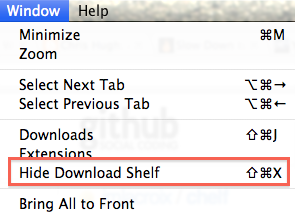
<p>Chelf adds an entry in the "Window" menu of Chrome, bound to CMD-SHIFT-X:</p>

<p style="text-align: center;"><img src="/img/chelf/menu.png" /></p>


<h2>Installation</h2>

<p>Chelf installation is straightforward. Just install <a href="http://www.culater.net/software/SIMBL/SIMBL.php">SIMBL</a>, download the Chelf <a href="http://github.com/downloads/jmlacroix/chelf/Chelf.bundle.zip">bundle</a> and copy it (unzipped) in one of the following directories: "<em>~/Library/Application Support/SIMBL/Plugins</em>" or "<em>/Library/Application Support/SIMBL/Plugins</em>".</p>

<p>Chelf will be added to your menu after you restart Google Chrome. It's possible that it won't be at the exact same place as in the screenshot.</p>

<p>You can fork the sources or report problems <a href="http://github.com/jmlacroix/chelf">on GitHub</a>.</p>

			</div>
		</content>
	</entry>
	
	<entry>
		<title>Publishing a Static Website on CloudFront</title>
		<link href="http://jmlacroix.com/archives/cloudfront-publishing.html" />
		<updated>2010-09-23T00:00:00-04:00</updated>
		<id>http://jmlacroix.com/archives/cloudfront-publishing</id>
		<content type="xhtml">
			<div xmlns='http://www.w3.org/1999/xhtml'>
			<p>My <a href="/archives/cloudfront-hosting.html">first CloudFront article</a> deals with basic S3 and CloudFront setup and with the DefaultRootObject which is the key of hosting a website on Amazon's CDN.</p>

<p>This second post focuses about getting your website <em>on</em> CloudFront by providing maintenance scripts to handle publishing and invalidation. Most of the scripts are generic, but the Rakefile targets a <a href="http://jekyllrb.com">Jekyll</a>-generated static site.</p>

<h2>The Rakefile</h2>

<p>First of all, here's my simple Rakefile. Don't try to use it yet, there's a lot of stuff missing.</p>

<p><a class="src" href="https://gist.github.com/592988?file=Rakefile#file_rakefile">#</a></p>


<pre>
task <span class="Constant">:default</span> =&gt; <span class="Constant">:server</span>

desc <span class="Special">'</span><span class="String">Start server with --auto</span><span class="Special">'</span>
task <span class="Constant">:server</span> <span class="Statement">do</span>
  jekyll(<span class="Special">'</span><span class="String">--server --auto</span><span class="Special">'</span>)
<span class="Statement">end</span>

desc <span class="Special">'</span><span class="String">Build site with Jekyll</span><span class="Special">'</span>
task <span class="Constant">:build</span> <span class="Statement">do</span>
  jekyll(<span class="Special">'</span><span class="String">--no-future</span><span class="Special">'</span>)
<span class="Statement">end</span>

desc <span class="Special">'</span><span class="String">Build and deploy</span><span class="Special">'</span>
task <span class="Constant">:publish</span> =&gt; <span class="Constant">:build</span> <span class="Statement">do</span>
  bucket = <span class="Special">'</span><span class="String">MYBUCKET</span><span class="Special">'</span>
  puts <span class="Special">&quot;</span><span class="String">Publishing site to bucket </span><span class="Special">#{</span>bucket<span class="Special">}</span><span class="Special">&quot;</span>
  sh <span class="Special">'</span><span class="String">ruby aws_cf_sync.rb _site/ </span><span class="Special">'</span> + bucket
<span class="Statement">end</span>

<span class="PreProc">def</span> <span class="Identifier">jekyll</span>(opts = <span class="Special">''</span>)
  sh <span class="Special">'</span><span class="String">rm -rf _site/*</span><span class="Special">'</span>
  sh <span class="Special">'</span><span class="String">jekyll </span><span class="Special">'</span> + opts
<span class="PreProc">end</span>
</pre>


<p>There's only 3 commands available:</p>

<ul>
<li>server: run the Jekyll server on localhost</li>
<li>build: generate the website in Jekyll's _site folder</li>
<li><strong>publish</strong>: sync the _site folder on a S3 bucket and invalidate its content</li>
</ul>


<p>The publish task is the only one I'll talk about, since the two others are really basic. Before continuing, make sure you have replaced "MYBUCKET" by your own S3 bucket.</p>

<h2>Directory synchronization</h2>

<p>I've written a script that wraps the <a href="http://s3tools.org/">s3cmd</a> "sync" command with an invalidation tool to help with updates:</p>

<p><a class="src" href="http://gist.github.com/592941">#</a></p>


<pre>
local   = <span class="Identifier">ARGV</span>[<span class="Constant">0</span>]
s3_dest = <span class="Identifier">ARGV</span>[<span class="Constant">1</span>]

<span class="Statement">if</span> local == <span class="Constant">nil</span> || s3_dest == <span class="Constant">nil</span>
  puts <span class="Special">&quot;</span><span class="String">syntax aws_cf_sync.rb local_source s3_dest</span><span class="Special">&quot;</span>
  <span class="Statement">exit</span>
<span class="Statement">end</span>

config = <span class="Special">&quot;</span><span class="Special">#{</span><span class="Type">Dir</span>.pwd<span class="Special">}</span><span class="String">/s3.config</span><span class="Special">&quot;</span>
<span class="Statement">if</span> !<span class="Type">File</span>.exists?(config)
  puts <span class="Special">&quot;</span><span class="String">please setup your s3.config file</span><span class="Special">&quot;</span>
  <span class="Statement">exit</span>
<span class="Statement">end</span>

invalidate = <span class="Special">&quot;</span><span class="Special">#{</span><span class="Type">Dir</span>.pwd<span class="Special">}</span><span class="String">/aws_cf_invalidate.rb</span><span class="Special">&quot;</span>
<span class="Statement">if</span> !<span class="Type">File</span>.exists?(invalidate)
  puts <span class="Special">&quot;</span><span class="String">please download the aws_cf_invalidate.rb script</span><span class="Special">&quot;</span>
  <span class="Statement">exit</span>
<span class="Statement">end</span>

s3_dest   = s3_dest.split(<span class="Special">'</span><span class="String">/</span><span class="Special">'</span>)
s3_bucket = s3_dest.shift
s3_path   = s3_dest.join(<span class="Special">'</span><span class="String">/</span><span class="Special">'</span>)

s3_path += <span class="Special">'</span><span class="String">/</span><span class="Special">'</span> <span class="Statement">unless</span> s3_dest.length == <span class="Constant">0</span>

<span class="Special">%x[</span><span class="String"> $(which s3cmd) -c </span><span class="Special">#{</span>config<span class="Special">}</span><span class="String"> sync </span><span class="Special">#{</span>local<span class="Special">}</span><span class="String"> s3://</span><span class="Special">#{</span>s3_bucket<span class="Special">}</span><span class="String">/</span><span class="Special">#{</span>s3_path<span class="Special">}</span><span class="String"> --acl-public </span><span class="Special">]</span>

files = <span class="Special">%x[</span><span class="String"> cd _site &amp;&amp; find . -type f </span><span class="Special">]</span>.split(<span class="Special">&quot;</span><span class="Special">\n</span><span class="Special">&quot;</span>).map <span class="Statement">do</span> |<span class="Identifier">f</span>|
  s3_path + f[<span class="Constant">2</span>,f.length]
<span class="Statement">end</span>

<span class="Special">%x[</span><span class="String"> ruby </span><span class="Special">#{</span>invalidate<span class="Special">}</span><span class="String"> </span><span class="Special">#{</span>files.join(<span class="Special">'</span><span class="String"> </span><span class="Special">'</span>)<span class="Special">}</span><span class="String"> </span><span class="Special">]</span>
</pre>


<p>To run this script, s3cmd has to be installed. On OSX, you can do so easily with homebrew:</p>

<pre><code>$ brew install s3cmd
</code></pre>

<p>Now, create an s3.config file (God I hate these) with the <em>s3cmd --configure</em> command or copy the following configuration. Don't forget to set your own AWS credentials (rows #2,3).</p>

<p><a class="src" href="https://gist.github.com/592988#file_s3.config">#</a></p>


<pre>
[default]
access_key = S3_ACCESS_KEY
secret_key = S3_SECRET_KEY
acl_public = False
bucket_location = US
cloudfront_host = cloudfront.amazonaws.com
cloudfront_resource = /2008-06-30/distribution
default_mime_type = binary/octet-stream
delete_removed = False
dry_run = False
encoding = UTF-8
encrypt = False
force = False
get_continue = False
gpg_command = None
gpg_decrypt = %(gpg_command)s -d --verbose --no-use-agent --batch --yes --passphrase-fd %(passphrase_fd)s -o %(output_file)s %(input_file)sgpg_encrypt = %(gpg_command)s -c --verbose --no-use-agent --batch --yes --passphrase-fd %(passphrase_fd)s -o %(output_file)s %(input_file)sgpg_passphrase = 
guess_mime_type = True
host_base = s3.amazonaws.com
host_bucket = %(bucket)s.s3.amazonaws.com
human_readable_sizes = False
list_md5 = False
preserve_attrs = True
progress_meter = True
proxy_host = 
proxy_port = 0 
recursive = False
recv_chunk = 4096
send_chunk = 4096
simpledb_host = sdb.amazonaws.com
skip_existing = False
urlencoding_mode = normal
use_https = False
verbosity = WARNING
</pre>


<p>You can test your s3cmd configuration by typing this command to list all your buckets:</p>

<pre><code>$ s3cmd -c s3.config ls
</code></pre>

<h2>Cache invalidation</h2>

<p>The sync script invalidates the cache of the published objects by calling this script:</p>

<p><a class="src" href="https://gist.github.com/589132">#</a></p>


<pre>
<span class="PreProc">require</span> <span class="Special">'</span><span class="String">rubygems</span><span class="Special">'</span>
<span class="PreProc">require</span> <span class="Special">'</span><span class="String">hmac-sha1</span><span class="Special">'</span>
<span class="PreProc">require</span> <span class="Special">'</span><span class="String">net/https</span><span class="Special">'</span>
<span class="PreProc">require</span> <span class="Special">'</span><span class="String">base64</span><span class="Special">'</span>

s3_access=<span class="Special">'</span><span class="String">S3_ACCESS_KEY</span><span class="Special">'</span>
s3_secret=<span class="Special">'</span><span class="String">S3_SECRET_KEY</span><span class="Special">'</span>
cf_distribution=<span class="Special">'</span><span class="String">CLOUDFRONT_DISTRIBUTION_ID</span><span class="Special">'</span>

<span class="Statement">if</span> <span class="Identifier">ARGV</span>.length &lt; <span class="Constant">1</span>
  puts <span class="Special">&quot;</span><span class="String">usage: aws_cf_invalidate.rb file1.html dir1/file2.jpg ...</span><span class="Special">&quot;</span>
  <span class="Statement">exit</span>
<span class="Statement">end</span>

paths = <span class="Special">'</span><span class="String">&lt;Path&gt;/</span><span class="Special">'</span> + <span class="Identifier">ARGV</span>.join(<span class="Special">'</span><span class="String">&lt;/Path&gt;&lt;Path&gt;/</span><span class="Special">'</span>) + <span class="Special">'</span><span class="String">&lt;/Path&gt;</span><span class="Special">'</span>

date = <span class="Type">Time</span>.now.utc
date = date.strftime(<span class="Special">&quot;</span><span class="String">%a, %d %b %Y %H:%M:%S %Z</span><span class="Special">&quot;</span>)
digest = <span class="Type">HMAC</span>::<span class="Type">SHA1</span>.new(s3_secret)
digest &lt;&lt; date

uri = <span class="Type">URI</span>.parse(<span class="Special">'</span><span class="String"><a href="https://cloudfront.amazonaws.com/2010-08-01/distribution/">https://cloudfront.amazonaws.com/2010-08-01/distribution/</a></span><span class="Special">'</span> + cf_distribution + <span class="Special">'</span><span class="String">/invalidation</span><span class="Special">'</span>)

req = <span class="Type">Net</span>::<span class="Type">HTTP</span>::<span class="Type">Post</span>.new(uri.path)
req.initialize_http_header({
  <span class="Special">'</span><span class="String">x-amz-date</span><span class="Special">'</span> =&gt; date,
  <span class="Special">'</span><span class="String">Content-Type</span><span class="Special">'</span> =&gt; <span class="Special">'</span><span class="String">text/xml</span><span class="Special">'</span>,
  <span class="Special">'</span><span class="String">Authorization</span><span class="Special">'</span> =&gt; <span class="Special">&quot;</span><span class="String">AWS %s:%s</span><span class="Special">&quot;</span> % [s3_access, <span class="Type">Base64</span>.encode64(digest.digest)]
})

req.body = <span class="Special">&quot;</span><span class="String">&lt;InvalidationBatch&gt;</span><span class="Special">&quot;</span> + paths + <span class="Special">&quot;</span><span class="String">&lt;CallerReference&gt;ref_</span><span class="Special">#{</span><span class="Type">Time</span>.now.utc.to_i<span class="Special">}</span><span class="String">&lt;/CallerReference&gt;&lt;/InvalidationBatch&gt;</span><span class="Special">&quot;</span>

http = <span class="Type">Net</span>::<span class="Type">HTTP</span>.new(uri.host, uri.port)
http.use_ssl = <span class="Boolean">true</span>
http.verify_mode = <span class="Type">OpenSSL</span>::<span class="Type">SSL</span>::<span class="Type">VERIFY_NONE</span>
res = http.request(req)

puts res.code
puts res.body
</pre>


<p>Note that you have to set your CloudFront distribution ID and your AWS credentials in the previous script too. Sorry for that, but I didn't feel like refactoring around this painful s3cmd config file.</p>

<h2>Summary and publishing</h2>

<p>In your Jekyll working directory, you should now have these files:</p>

<ul>
<li>Rakefile: rake tasks to easily manage your site</li>
<li>aws_cf_sync.rb: script that syncs your local files with your S3 bucket</li>
<li>aws_cf_invalidate.rb: script that invalidates the cache of the updated files</li>
<li>s3.config: the configuration of your s3 bucket</li>
</ul>


<p>Before publishing, I suggest you add these exclusions in your <em>_config.yml</em> file:</p>

<pre><code>exclude: [ Rakefile, aws_cf_sync.rb,
           aws_cf_invalidate.rb, s3.config ]
</code></pre>

<p>If you've been a good reader and followed every instruction, all you have to do to publish your website on your S3 bucket and invalidate the CloudFront cache is:</p>

<pre><code>$ rake publish
</code></pre>

<p>You can now fire up your browser and refresh frantically until you see your changes.</p>

			</div>
		</content>
	</entry>
	
	<entry>
		<title>Hosting a Static Website on CloudFront</title>
		<link href="http://jmlacroix.com/archives/cloudfront-hosting.html" />
		<updated>2010-09-22T00:00:00-04:00</updated>
		<id>http://jmlacroix.com/archives/cloudfront-hosting</id>
		<content type="xhtml">
			<div xmlns='http://www.w3.org/1999/xhtml'>
			<p>I recently tried to use Amazon's CloudFront to host my static <a href="http://jekyllrb.com">Jekyll</a>-generated homepage. Here's a couple of reasons I really wanted to do that:</p>

<ul>
<li>It's dirt cheap</li>
<li>It's blazing fast</li>
<li>It's a nice "hack"</li>
</ul>


<p>By "hack" I mean that it's not really it's purpose, so there are a couple of downsides:</p>

<ul>
<li>No error pages (404, etc)</li>
<li>More complex to setup than most hosting</li>
<li>No page redirection between www.yourdomain.com and yourdomain.com <sup id="fn1"><a href="#ffn1">1</a></sup></li>
</ul>


<p>This posts only covers the basic S3 &amp; CloudFront setup you need to host a static website there. In a next post I'll show you how I sync my Jekyll generated files.</p>

<h2>Create a S3 bucket</h2>

<ol>
<li>In the AWS Console, go to the "Amazon S3" tab.</li>
<li>Use the "Create Bucket" button to create a bucket named MYBUCKET.</li>
<li>Right click on your newly created bucket and bring the properties panel.</li>
<li>(<em>Optional <sup id="fn2"><a href="#ffn2">2</a></sup></em>) Make your bucket public-readable by clicking the "Edit bucket policy" in the "Permissions" tab and adding the following code (don't forget to change MYBUCKET to your bucket name):

<pre><code> {
   "Version":"2008-10-17",
   "Statement":[{
     "Sid":"AddPerm",
     "Effect":"Allow",
       "Principal": {
   "AWS": "*"
       },
       "Action":["s3:GetObject"],
       "Resource":["arn:aws:s3:::BUCKETNAME/*"]
     }
   ]
 }
</code></pre></li>
</ol>


<h2>Configure a CloudFront distribution</h2>

<ol>
<li>In the AWS Console, go to the "Amazon CloudFront" tab.</li>
<li>Click on the "Create Distribution" button.</li>
<li>Select the MYBUCKET bucket we created earlier as the origin.</li>
<li>Specify the CNAMEs your site will be hosting (your site domain name).</li>
<li>Back in the CloudFront distributions list, select your newly created distribution and copy it's "Domain Name".</li>
</ol>


<h2>Edit domain's DNS records</h2>

<ol>
<li>Go to your domain's DNS record manager.</li>
<li>Set your domain or subdomain so it points to your CloudFront distribution domain name as a CNAME record <sup id="fn3"><a href="#ffn3">3</a></sup>.</li>
<li>When your DNS finally refreshes (remember, it can be long), you should be able to access your bucket by using your domain or subdomain.</li>
</ol>


<h2>Setting the DefaultRootObject</h2>

<p>The last step is the fun part, since it requires you to run some crafty ruby code.</p>

<p>Since there's no support (yet) in the AWS Console to set the DefaultRootObject (and it's not present in a lot of S3/CloudFront software neither), I've written a small ruby script to allow you to enable it on your distribution.</p>

<p>Here's the code:</p>

<p><a class="src" href="https://gist.github.com/591196">#</a></p>


<pre>
<span class="PreProc">require</span> <span class="Special">'</span><span class="String">rubygems</span><span class="Special">'</span>
<span class="PreProc">require</span> <span class="Special">'</span><span class="String">hmac-sha1</span><span class="Special">'</span>
<span class="PreProc">require</span> <span class="Special">'</span><span class="String">net/https</span><span class="Special">'</span>
<span class="PreProc">require</span> <span class="Special">'</span><span class="String">base64</span><span class="Special">'</span>

s3_access=<span class="Special">'</span><span class="String">S3_ACCESS_KEY</span><span class="Special">'</span>
s3_secret=<span class="Special">'</span><span class="String">S3_SECRET_KEY</span><span class="Special">'</span>
cf_distribution=<span class="Special">'</span><span class="String">CLOUDFRONT_DISTRIBUTION_ID</span><span class="Special">'</span>

newobj = <span class="Identifier">ARGV</span>[<span class="Constant">0</span>]

<span class="Statement">if</span> newobj == <span class="Constant">nil</span>
  puts <span class="Special">&quot;</span><span class="String">usage: aws_cf_setroot.rb index.html</span><span class="Special">&quot;</span>
  <span class="Statement">exit</span>
<span class="Statement">end</span>

date = <span class="Type">Time</span>.now.utc
date = date.strftime(<span class="Special">&quot;</span><span class="String">%a, %d %b %Y %H:%M:%S %Z</span><span class="Special">&quot;</span>)
digest = <span class="Type">HMAC</span>::<span class="Type">SHA1</span>.new(s3_secret)
digest &lt;&lt; date

uri = <span class="Type">URI</span>.parse(<span class="Special">'</span><span class="String"><a href="https://cloudfront.amazonaws.com/2010-08-01/distribution/">https://cloudfront.amazonaws.com/2010-08-01/distribution/</a></span><span class="Special">'</span> + cf_distribution + <span class="Special">'</span><span class="String">/config</span><span class="Special">'</span>)

req = <span class="Type">Net</span>::<span class="Type">HTTP</span>::<span class="Type">Get</span>.new(uri.path)

req.initialize_http_header({
  <span class="Special">'</span><span class="String">x-amz-date</span><span class="Special">'</span> =&gt; date,
  <span class="Special">'</span><span class="String">Content-Type</span><span class="Special">'</span> =&gt; <span class="Special">'</span><span class="String">text/xml</span><span class="Special">'</span>,
  <span class="Special">'</span><span class="String">Authorization</span><span class="Special">'</span> =&gt; <span class="Special">&quot;</span><span class="String">AWS %s:%s</span><span class="Special">&quot;</span> % [s3_access, <span class="Type">Base64</span>.encode64(digest.digest)]
})

http = <span class="Type">Net</span>::<span class="Type">HTTP</span>.new(uri.host, uri.port)
http.use_ssl = <span class="Boolean">true</span>
http.verify_mode = <span class="Type">OpenSSL</span>::<span class="Type">SSL</span>::<span class="Type">VERIFY_NONE</span>
res = http.request(req)

currentobj = <span class="Special">/</span><span class="String">&lt;DefaultRootObject&gt;</span><span class="Special">(</span><span class="Special">.</span><span class="Special">*?</span><span class="Special">)</span><span class="String">&lt;</span><span class="Special">\/</span><span class="String">DefaultRootObject&gt;</span><span class="Special">/</span>.match(res.body)[<span class="Constant">1</span>]

<span class="Statement">if</span> newobj == currentobj
  puts <span class="Special">&quot;</span><span class="String">'</span><span class="Special">#{</span>currentobj<span class="Special">}</span><span class="String">' is already the DefaultRootObject</span><span class="Special">&quot;</span>
  <span class="Statement">exit</span>
<span class="Statement">end</span>

etag = res.header[<span class="Special">'</span><span class="String">etag</span><span class="Special">'</span>]

req = <span class="Type">Net</span>::<span class="Type">HTTP</span>::<span class="Type">Put</span>.new(uri.path)

req.initialize_http_header({
  <span class="Special">'</span><span class="String">x-amz-date</span><span class="Special">'</span> =&gt; date,
  <span class="Special">'</span><span class="String">Content-Type</span><span class="Special">'</span> =&gt; <span class="Special">'</span><span class="String">text/xml</span><span class="Special">'</span>,
  <span class="Special">'</span><span class="String">Authorization</span><span class="Special">'</span> =&gt; <span class="Special">&quot;</span><span class="String">AWS %s:%s</span><span class="Special">&quot;</span> % [s3_access, <span class="Type">Base64</span>.encode64(digest.digest)],
  <span class="Special">'</span><span class="String">If-Match</span><span class="Special">'</span> =&gt; etag
})

<span class="Statement">if</span> currentobj == <span class="Constant">nil</span>
  regex = <span class="Special">/</span><span class="String">&lt;</span><span class="Special">\/</span><span class="String">DistributionConfig&gt;</span><span class="Special">/</span>
  replace = <span class="Special">&quot;</span><span class="String">&lt;DefaultRootObject&gt;</span><span class="Special">#{</span>newobj<span class="Special">}</span><span class="String">&lt;/DefaultRootObject&gt;&lt;/DistributionConfig&gt;</span><span class="Special">&quot;</span>
<span class="Statement">else</span>
  regex = <span class="Special">/</span><span class="String">&lt;DefaultRootObject&gt;</span><span class="Special">(</span><span class="Special">.</span><span class="Special">*?</span><span class="Special">)</span><span class="String">&lt;</span><span class="Special">\/</span><span class="String">DefaultRootObject&gt;</span><span class="Special">/</span>
  replace = <span class="Special">&quot;</span><span class="String">&lt;DefaultRootObject&gt;</span><span class="Special">#{</span>newobj<span class="Special">}</span><span class="String">&lt;/DefaultRootObject&gt;</span><span class="Special">&quot;</span>
<span class="Statement">end</span>

req.body = res.body.gsub(regex, replace)

http = <span class="Type">Net</span>::<span class="Type">HTTP</span>.new(uri.host, uri.port)
http.use_ssl = <span class="Boolean">true</span>
http.verify_mode = <span class="Type">OpenSSL</span>::<span class="Type">SSL</span>::<span class="Type">VERIFY_NONE</span>
res = http.request(req)

puts res.code
puts res.body
</pre>


<p>You need to edit 3 configuration lines at the top of the file:</p>

<ol>
<li>Set s3_access to your S3 access key</li>
<li>Set s3_secret to your S3 secret key</li>
<li>Set cf_distribution to your CloudFront distribution ID (get it in the properties pane of your "Amazon CloudFront" tab in the AWS Console)</li>
</ol>


<p>You are now ready to set your DefaultRootObject by running the script with the name of the file you want for root object as parameter:</p>

<pre><code>$ ruby aws_cf_setroot.rb index.html
</code></pre>

<p>index.html is now the default root object (meaning it won't work for subfolders). There may be a small delay before it works, but if you go to yourdomain.com in a web browser, you should be shown your default index.html page.</p>

<p><footer>
  <a href="/">Jean-Michel Lacroix</a> &ndash;
  <time datetime="2010-09-22T00:00:00-04:00" pubdate="pubdate">September 22, 2010</time>
</footer></p>

<p><section class="footnotes"></p>

<ol>
<li id="ffn1">That could be fixed with a second bucket with the exact same html files that meta refreshes the page to the correct URL. That's overkill, but it should be good enough for basic SEO. <a href="#fn1" title="Jump back to footnote 1 in the text.">&#8617;</a></li>
<li id="ffn2">You could skip this step, but you need to make sure you override the ACLs every time you update your site. <a href="#fn2" title="Jump back to footnote 2 in the text.">&#8617;</a></li>
<li id="ffn3">Not all DNS providers can do that. I'm currently using namecheap.com which allows it. <a href="#fn3" title="Jump back to footnote 3 in the text.">&#8617;</a></li>
</ol>


<p></section></p>

			</div>
		</content>
	</entry>
	
</feed>